Features
Everything needed to produce legal work product—in one focused application.
Document Editors
Two purpose-built editors for every type of court filing. No templates to download, no formatting to fight — open a document and start drafting.
28-Line Pleading Editor
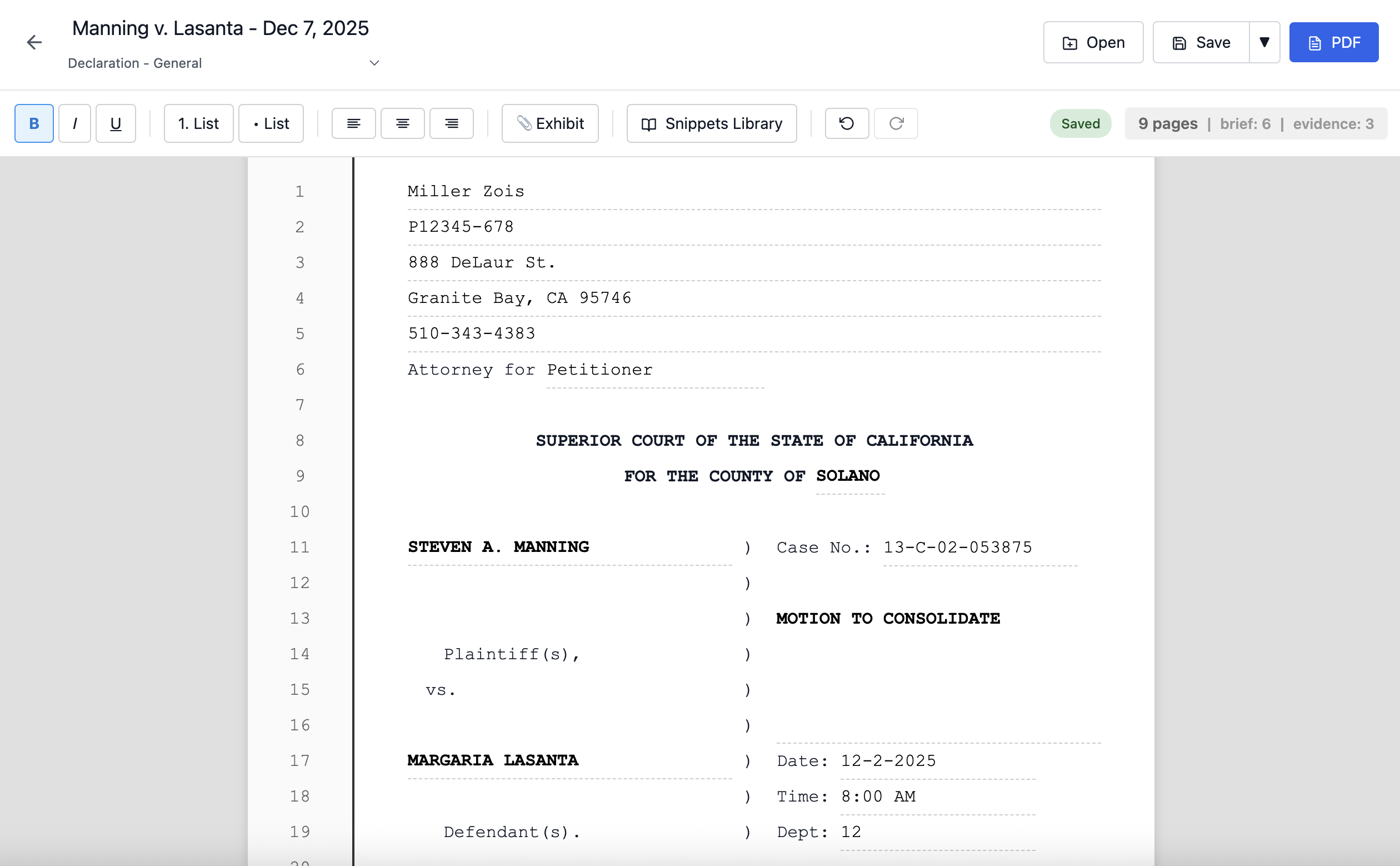
California's strict 28-line format, built in. Numbered lines, auto-populated caption page, and WYSIWYG PDF export — every line in the editor is the same line in the PDF.
- Auto-populated caption page — attorney, client, case number, and court filled from case data.
- 28 numbered lines per page — California court requirement, always correct.
- Row-for-row PDF export — what you see is what the court receives.
- Document templates — Declaration, Notice of Motion, Stipulation, Ex Parte Application, and more.
- Exhibit Index — CRC Rule 2.134 compliant index page generated automatically.
Brief & Motion Editor
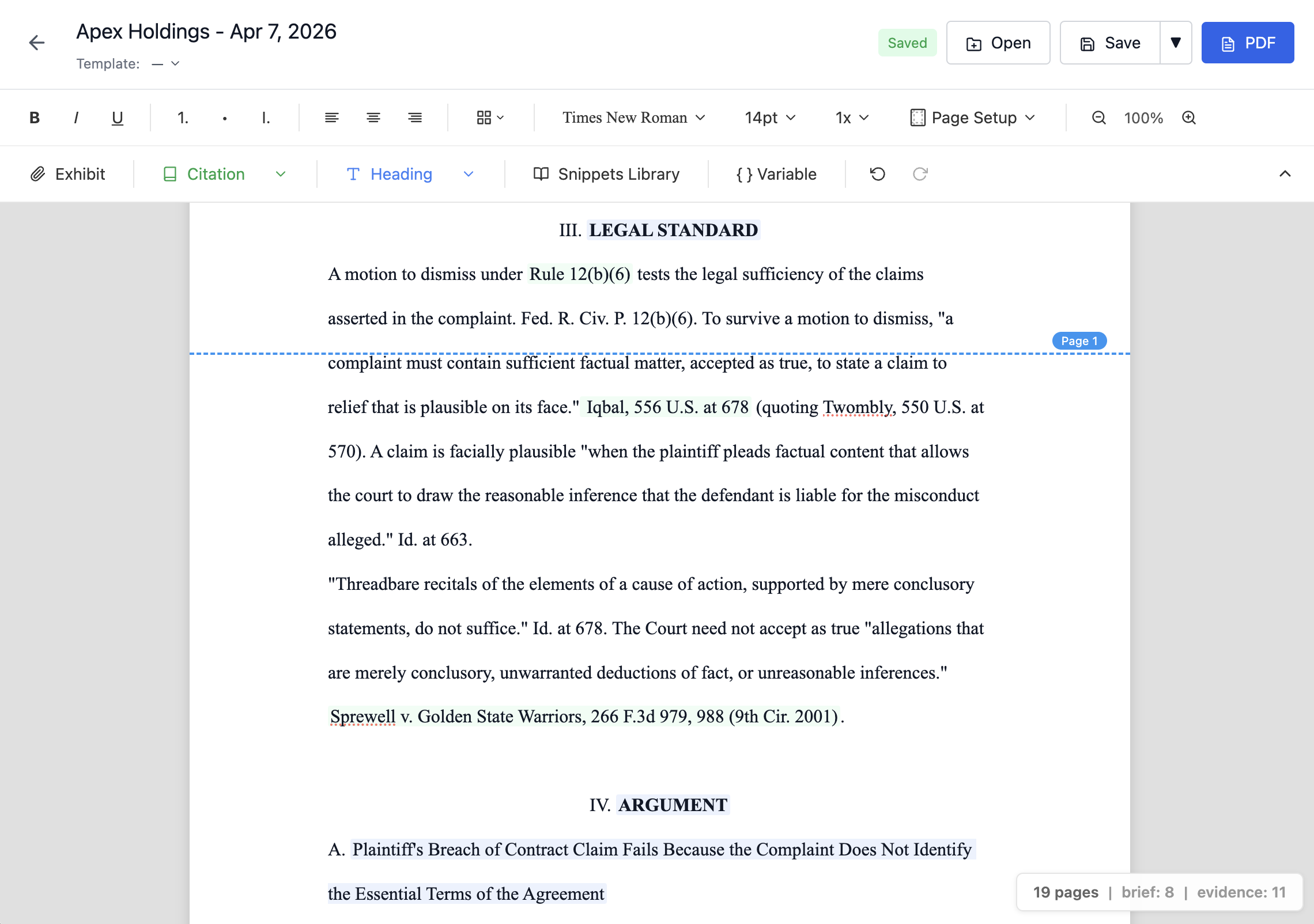
For motions, memoranda, briefs, and any court filing that doesn't use the 28-line format. Proportional fonts, configurable spacing, and court-specific presets — the Word replacement you've been waiting for.
- Proportional fonts — Times New Roman, Arial, Courier New, Georgia. Per-selection font sizes from 8pt to 18pt.
- Configurable spacing — double, 1.5, or single spacing, adjustable per paragraph.
- Court presets — one-click formatting for CA Superior, CA Appellate, Federal, and 9th Circuit requirements.
- Court caption blocks — CA-style two-column with vertical bar or federal full-width stacked, auto-populated from case data.
- WYSIWYG page breaks — see exactly where each page ends as you type, even with mixed content like single-spaced TOA inside a double-spaced brief.
Customization & Templates
Both editors share a powerful template and customization system. Save any document as a reusable template — caption, formatting, layout, and all.
- Template variables — insert variables for client name, case number, court, opposing party, and more. They auto-populate from your case data. Lock a variable to freeze its value, or format it inline with bold, italic, font size, and text transform.
- Custom document templates — save any document as a template. Built-in templates get you started; your saved templates make you faster over time.
- Configurable margins and footers — set margins to match court requirements, configure page number format.
- Legal outline lists — hierarchical numbering (I, A, 1, a, i) built into both editors.
- Search & Replace — find and replace across your entire document.
Table of Authorities & Table of Contents
Tag your citations. Mark your headings. The TOA and TOC build themselves — and stay accurate as you edit. Add a section, move a paragraph, insert a page of argument — page numbers recalculate live. No regenerating, no manual updates, no stale references.
- Live page numbers — page references update in real time as content changes. Works in both the Pleading Editor and Brief Editor.
- Citation tagging — Cmd+Shift+C to tag citations across five categories: Cases, Constitutional Provisions, Statutes, Court Rules, and Secondary Sources.
- Heading marking — Cmd+Shift+H with heading levels H1 through H4. Edit a heading in the TOC and the in-text heading updates too.
- Court-compliant formatting — dot leaders, hanging indents, passim for citations appearing on five or more pages. CRC 8.204 compliant.
Dynamic Evidence Reference System
Smart exhibit references that automatically update when evidence is reorganized. Instead of typing "See Exhibit A, p. 4" manually, click the Exhibit button (or Cmd+Shift+E) and select your evidence and page.
Pleadit inserts a formatted reference: "Exhibit A, pages 3-5". Add, remove, or reorder exhibits—every reference recalculates automatically throughout the document.
- Smart references — references store the file ID, not the exhibit letter. They survive any reorganization.
- Dual page numbering — references show both the page within the exhibit and the page within the compiled PDF: "Ex. A, p. 5 (PDF p. 47)".
- In-editor navigation — click any reference to scroll directly to that exhibit page.
- PDF hyperlinks — exported PDFs have working internal links. Judges can click to jump directly to cited evidence.
- Automatic updates — reorganize exhibits at any time, even after a last-minute document production. All references adapt.
Works across motions, declarations, trial briefs, and any document referencing exhibits.
Evidence Locker
Centralized storage for all case evidence with integrated exhibit management. Upload once, cite precisely throughout your pleadings.
- Drag-and-drop upload — add PDFs, images, and documents with ease.
- Automatic exhibit labeling — files are designated A, B, C... automatically.
- Page-specific references — reference exact pages within exhibits from the editor.
- Inline rendering — exhibits compile at the end of your document, ready to file.
- File preview — view evidence without leaving the application.
Auto-Populated Judicial Council Forms
74+ California Judicial Council forms with automatic field population. Enter client and case data once—forms generate in under three seconds with key fields populated automatically.
Supported Form Categories
- Family Law: FL-100, FL-110, FL-120, FL-142, FL-150, FL-300, FL-303, FL-305, FL-320, FL-341, FL-950, and more.
- Domestic Violence: DV-100 through DV-800 series. Client addresses intentionally left blank for safety.
- Civil Litigation: CM-010, CIV-050, CIV-100 through CIV-151, complaint forms.
- Civil Complaints: PLD-C-001 series, PLD-PI-001 series, PLD-050.
- Summons & Judgment: SUM-100, SUM-110, JUD-100.
- Subpoenas: SUBP-001, SUBP-002.
- Remote Appearances: RA-010 through RA-030.
- General: MC-050, EFS-050.
Save incomplete forms and return to them later. Edit fields directly in the PDF viewer.
Snippets Library
Store and reuse frequently-used legal text across all documents. Statutory citations, standard arguments, boilerplate procedural language—saved once, available everywhere.
- Unified library — the same snippets work in both the pleading editor and court forms.
- Context-aware tags — filter snippets by "pleading" or "forms" context.
- One-click insertion — insert saved text at cursor position instantly.
- Format conversion — rich text converts to plain text for forms automatically.
Eliminates redundant typing across cases. Common use cases include Family Code § 2030 citations, standard legal arguments, and recurring form field entries.
Practice Management
Full practice management foundation built in. All client data, cases, forms, pleadings, evidence, and hearings organized in one place.
- Client database — add, edit, delete, and search clients.
- Multiple cases per client — track repeat clients across matters.
- Case details — case number, court, parties, children, hearings.
- Centralized access — all forms, pleadings, evidence, and hearings accessible per case.
Security
Cyberattacks are surging in legal tech. According to recent reports:
- 1 in 5 law firms attacked in the past year
- 56% of breached firms lose sensitive client data
- Average breach costs $5.08 million
- Nearly 40% of clients would fire or consider firing a firm that experienced a breach
With Pleadit, all data stays on your computer. The security model is simple:
- Local-only data — all client data stays on your device.
- No cloud servers — zero external data transmission.
- No login credentials — nothing to steal or expose.
- No third-party access — data under your direct control.
Client information stays under your control, not on someone else's server.
Storage & Backup
Reliable local data management with backup and restore capabilities.
- Hierarchical storage — files organized by client, case, and type.
- Database backup — one-click backup with restore functionality.
- Local-only — all data on your device, under your control.