Stop fighting Word. Meet the serious editor built for lawyers.
Pleadit is an app that handles the repeat work in any document that points to evidence and other files. Every reference stays correct no matter how you edit. And anything you’d normally retype — names, dates, parties — you set once and reuse everywhere. Any PDF form can fill itself from your info.
The Problem
You're drafting a motion. You cite "Exhibit A, page 10" in paragraph 12, then "Exhibit A, page 15" in paragraph 18. You have 15 exhibit references throughout your brief, then a better document surfaces, or the evidence needs reordering. Now Exhibit A needs to become Exhibit C.
You spend the next hour or more hunting through your document, manually changing every "Exhibit A" to "Exhibit C." One mistake and the brief you filed doesn't match the exhibit packet you submitted.
The same problem runs through everything else you file:
- Tables of Authorities and Contents — built by hand at the end, then stale the moment you edit a paragraph. Always the last thing before filing, and always done twice.
- Microsoft Word — paste in a quote or a clause and it arrives with its own formatting that won't conform to the document; edit one section and the spacing and alignment shift elsewhere. More time fixing formatting than writing the argument.
- Court and agency forms — the same client name, case number, and party details typed into dozens of fields, every new matter. One mistype is a filing defect.
- Clio, MyCase, and other practice management tools — they hold your case data, but there's nowhere to draft. You retype the client's name, case number, court, and parties into a blank Word document anyway.
Generating quality work product shouldn't require juggling multiple programs, hunting through folders, or wrestling with technical headaches.
The Solution
Pleadit™ does all of it in one application:
- Exhibit references that update themselves — Reorder, add, or remove an exhibit and every citation recalculates, with working links to the exact page in the PDF. No find-and-replace, no missed references.
- A Table of Authorities and Table of Contents that stay current — Tag a citation or mark a heading once; both build as you write, and the page numbers update when you edit. No rebuilding at the end.
- Formatting that holds — Margins, spacing, captions, and page numbers that don't break when you paste or export, and California's 28-line pleading format built in. What you see in the editor is what the court receives.
- Enter once, use everywhere — Your client, case, and court details fill the caption and carry into every document and form you file — no retyping the parties or the case number. Your standard language and whole prior documents save as reusable templates.
- Your drafts and evidence in one place — Documents, exhibits, and source files in one local app. No jumping out to Word.
Pleadit is already in use on active cases.
Why This Matters
Time Savings
Hours saved per case. Days saved per month. Weeks saved across your caseload.
No fighting Word's formatting. No repetitive data entry — template variables populate client, case, and court information automatically. No templates to find or create. Just one application for work product.
Accuracy
Reference errors undermine credibility. Pleadit ensures exhibit letters, internal page numbers, and PDF page references stay synchronized. Your Table of Authorities and Table of Contents stay accurate as you edit — page numbers recalculate live. Attorney, client, case, and court information populates consistently across all forms and documents.
Professionalism
PDF hyperlinks allow judges to navigate directly to cited evidence — an advantage over opposing counsel's static filings. All data and work stays securely on your device.
Flexibility
Restructure your exhibit list at any point — even after a last-minute document production. References adapt automatically. Switch between court formatting presets — CA Superior, CA Appellate, Federal, 9th Circuit — without reformatting your document.
What's inside
One Editor. Every Legal Document.
An editor for pleadings, briefs, motions, and correspondence — no Word needed.
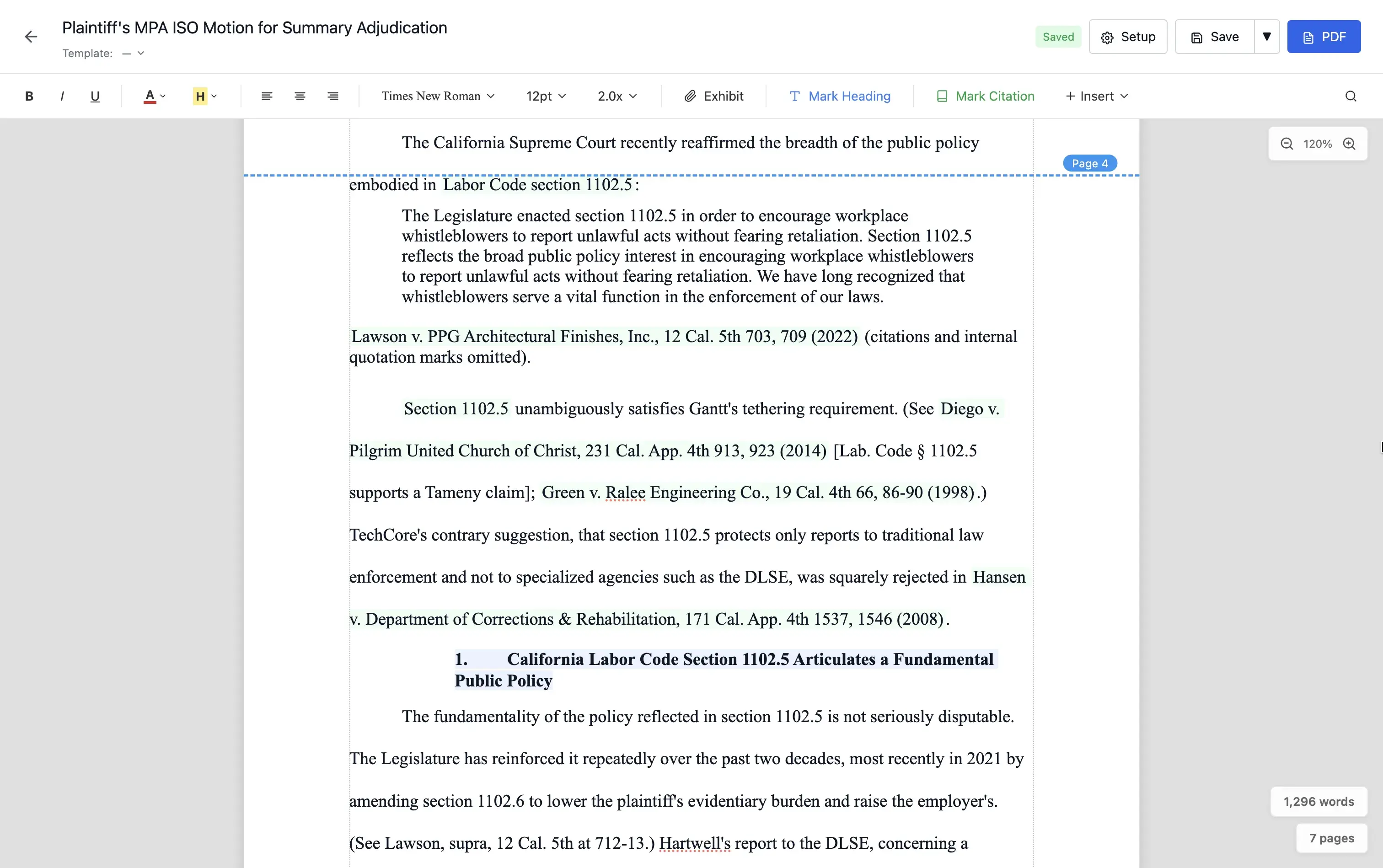
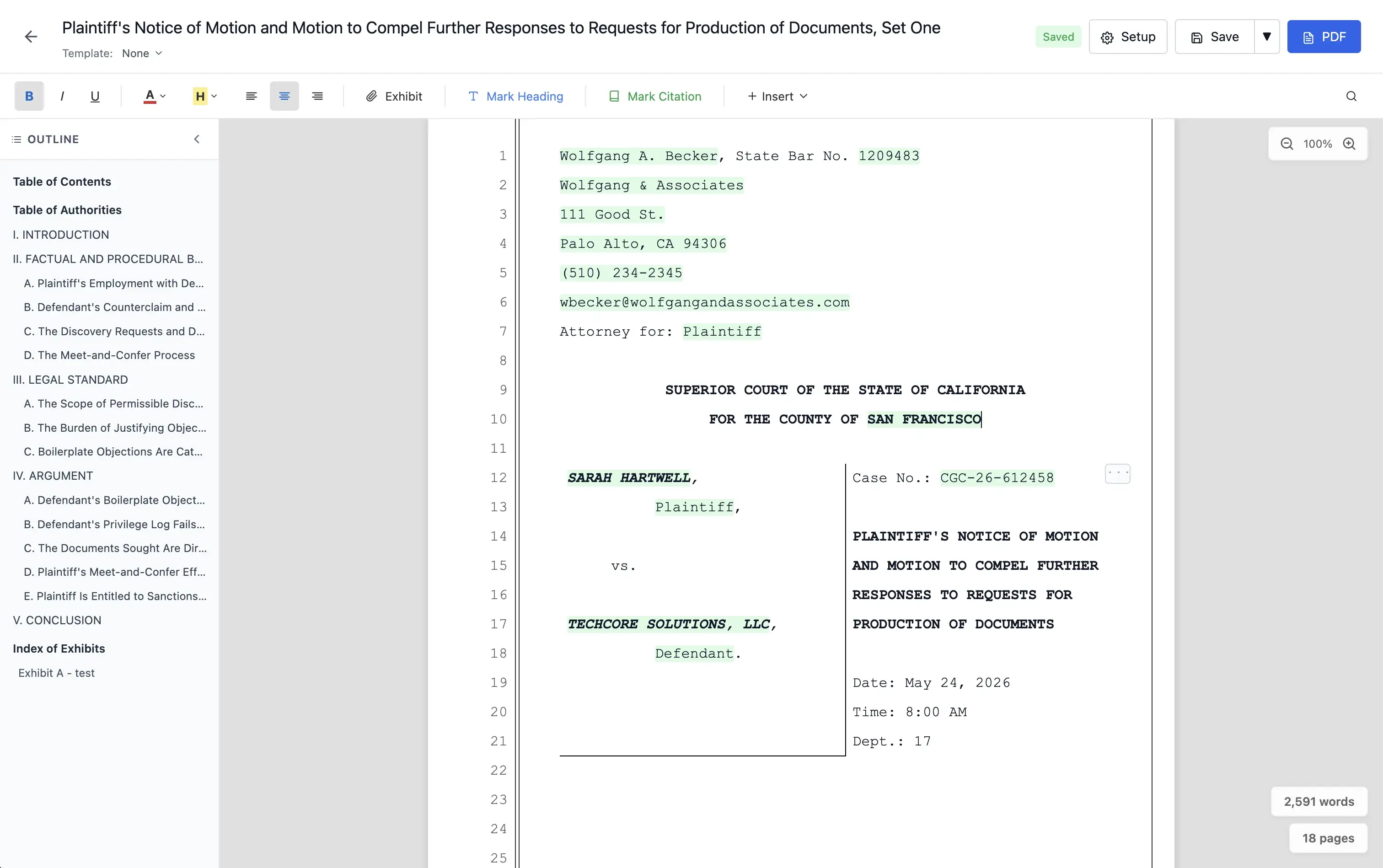
- Built for everything you file — briefs, motions, pleadings (including the California 28-line numbered format), notices on letterhead, demand letters, and meet-and-confer.
- Caption pages auto-populate — court, county, case number, parties, attorney block. Filled in the moment you open a new document. No retyping the same heading on every motion.
- Drop a variable anywhere — any document, any form. Client name, case number, judge, today's date, firm logo, drawn signature — pulled live from your case data.
- Reusable document templates — save any document as a template. Formatting, caption, and layout all stay intact. Build it once, use it on every matching matter.
- Fully customizable formatting — margins, headers, footers, fonts, line spacing — set per document or saved into a template. One-click presets for California Superior, California Appellate, Federal, and 9th Circuit. Match any court's local rules.
- Table of Authorities and Table of Contents in one click — page numbers update as you edit. No more renumbering by hand the night before filing.
- PDF export, ready to file — formatted exactly the way the court receives it, with PDF bookmarks for e-filing built in. No Adobe Pro required.
Move an exhibit. Every citation adapts.
Citing evidence usually means typing "See Exhibit A, p. 4" by hand, then re-typing it every time discovery shifts the exhibit order.
In Pleadit, exhibit references are dynamic. Press Cmd+Shift+X, pick the evidence and the page, and Pleadit drops a live reference into the document. Reorder the exhibits and every reference renumbers itself automatically — no hunting through the brief to renumber exhibits by hand the night before filing. You set the format per document; the default is "Ex. A, p. 3 (PDF p. 63)," but match whatever your court or firm prefers.
- Click in the editor — jump to the cited exhibit page.
- Click in the exported PDF — the judge lands on the exact page.
- Configurable citation format — short form, long form, with or without compiled PDF page numbers.
Works across motions, declarations, briefs — anywhere you cite evidence.
All evidence. One place.
Centralized storage for all case evidence. Upload once, cite precisely throughout your pleadings.
- Supports PDFs, images, and documents.
- Cite specific pages directly from the editor.
- Exhibits compile at the end of your document, ready to file.
Forms that fill themselves.
Pleadit's in-app Form Editor turns the forms you actually file into reusable templates. Your state's cover sheets, your federal filings, your county-specific forms, your agency forms — Pleadit auto-populates each one with the key information from your case.
California attorneys also get a starter library of pre-mapped Judicial Council templates — Family Law, Domestic Violence, Civil, Summons, Subpoenas — included out of the box.
Type it once. Use it forever.
Build pleadings from reusable, modular paragraphs. Store frequently used text — statutory citations, standard requests, boilerplate clauses — and drop them into any document or form with one click.
- Functions in all editors and court forms.
- Insert saved text with one click.
- Eliminates redundant typing across cases.
Your data stays put.
Cyberattacks are surging in legal tech, with 1/5 law firms attacked this past year. Of firms that suffer a breach, 56% lose sensitive client data — and the average breach costs $5.08 million. Clients care, with nearly 40% saying they would fire or consider firing a firm that experienced a breach.
With Pleadit, all data stays on your computer. No cloud servers or third-party server access. No login credentials exposed. Client information stays under your control.
Comparison
| Feature | Today's stack Word + Clio/MyCase | Pleadit |
|---|---|---|
| Built-in document editor | Word only | |
| Reusable document templates | Word — templates break | |
| Auto-populated caption pages | ||
| Drop-in case-data variables | ||
| Auto-updating exhibit references | ||
| Evidence locker / exhibit organization | ||
| One-click Table of Authorities and Table of Contents | ||
| Court formatting presets | ||
| Auto-populating court PDFs | ||
| PDF e-filing bookmarks | needs Adobe Pro | |
| Local-first (no cloud) |