Software to produce work product — pleading papers, PDF assembly, and Judicial Council forms in one focused application. Features the legal industry's first integrated Pleading Paper Editor and Dynamic Evidence Reference System.
From a former Google designer building better tools for lawyers.
Already a beta tester? Download the latest version →
The Problem
You're drafting a motion. You cite "Exhibit A, page 10" in paragraph 12, then "Exhibit A, page 15" in paragraph 18. You have 15 exhibit references throughout your brief, then opposing counsel produces more discovery—or you realize a different document should come first. Now Exhibit A needs to become Exhibit C.
You spend the next hour or more hunting through your document, manually changing every "Exhibit A" to "Exhibit C." One mistake could make you look careless and jeopardize your credibility in front of the judge.
The rest of legal document preparation has the same problems:
- Microsoft Word — pleading paper templates that conflict with line numbering. Formatting that breaks on PDF export.
- Clio, MyCase, and other practice management tools — capable case management, but no word processor built for legal documents. You still end up in Word, and the headaches of copy/pasting codes and logging in.
- Judicial Council forms — repetitive data entry across dozens of fields, with a learning curve for each form.
- Proofs of service, declarations, repetitive filings — manually changing names, case numbers, and party information repeatedly.
Generating quality work product shouldn't require juggling multiple programs, hunting through folders, or wrestling with technical headaches.
The Solution
Pleadit™ is software to produce work product—legal word processing, PDF assembly, California-compliant formatting, and Judicial Council forms, all in one focused application. It features the legal industry's first integrated Pleading Paper Editor and Dynamic Evidence Reference System.
How it works:
- Enter attorney information once (name, bar number, address, phone).
- Create a client and case—names, case number, court, parties.
- Upload case evidence to the Evidence Locker.
- Open the pleading editor and draft your brief.
- Cite evidence directly. Pleadit inserts the reference: "Ex. A, p. 10 (PDF p. 15)"
- All references and their page numbers update automatically when exhibits are added, removed, or reordered. "Ex. C, p. 5 (PDF p. 47)" becomes "Ex. A, p. 5 (PDF p. 14)" throughout the document.
- Export to PDF with clickable hyperlinks that jump to the exact page.
No manual updates. No reference errors. Functional PDF hyperlinks.
Pleadit is already in use on active cases.
Why This Matters
Time Savings
Hours saved per case. Days saved per month. Weeks saved across your caseload.
No technical headaches jumping between programs and files. No repetitive data entry for client and case information. No templates to find or create. Just one application for work product.
Accuracy
Reference errors undermine credibility. Pleadit ensures exhibit letters, internal page numbers, and PDF page references stay synchronized. Attorney, client, case, and court information populates consistently across all forms and documents.
Professionalism
PDF hyperlinks allow judges to navigate directly to cited evidence—an advantage over opposing counsel's static filings. All data and work stays securely on your device.
Flexibility
Restructure your exhibit list at any point—even after a last-minute document production. References adapt automatically.
Features
California-Compliant Pleading Editor
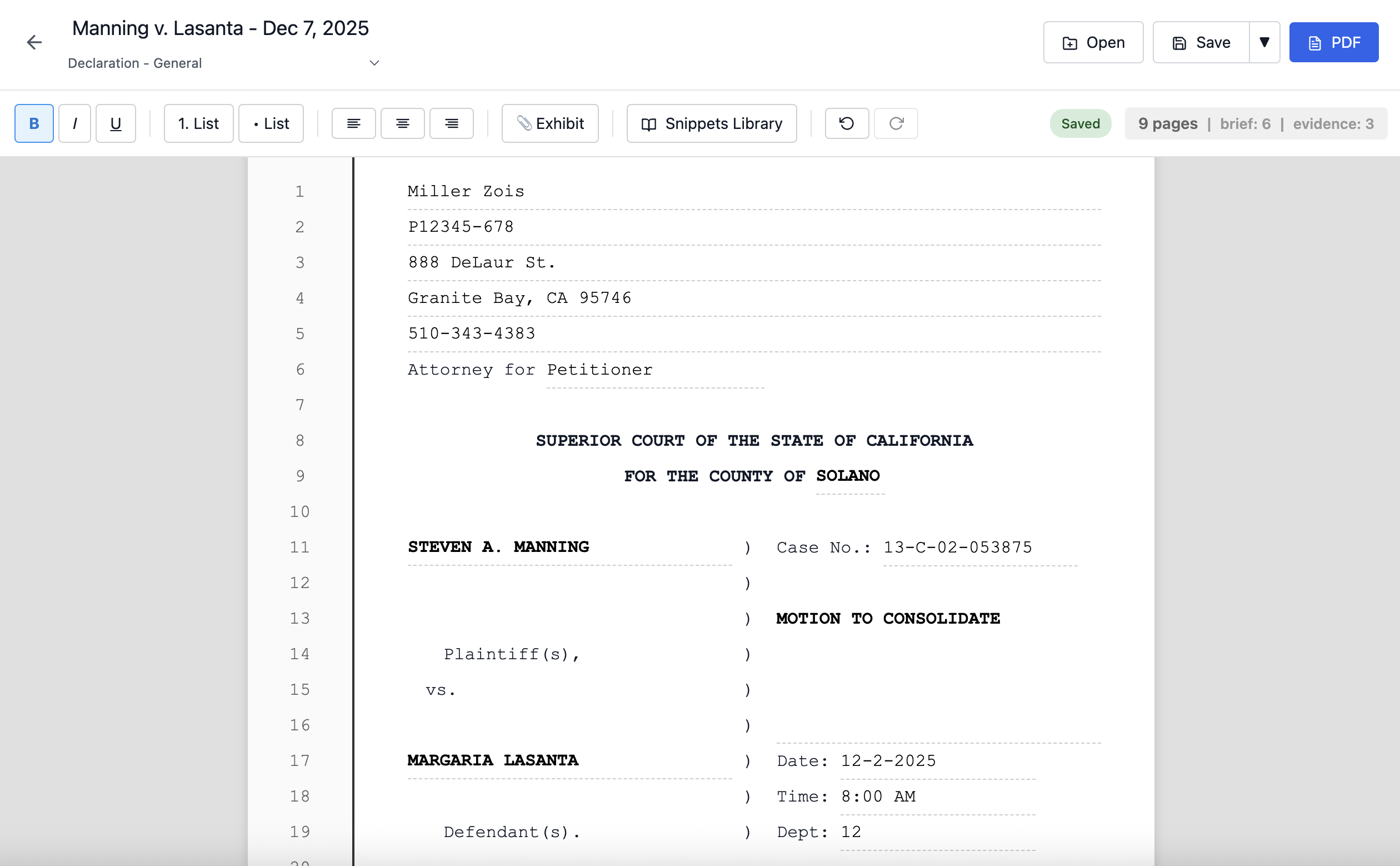
Numbered pleading pages ready on launch. No templates or manual formatting needed.
- Auto-populated caption page — attorney information, client name, case number, and court filled automatically.
- 28 numbered lines per page — California court requirement, built in.
- Synchronized headers and footers — change the document title once, updates propagate throughout.
- Automatic page flow — content moves seamlessly between pages.
- WYSIWYG PDF export — output matches the editor exactly row-for-row.
- Full text formatting — bold, italic, underline, indentation, lists.
- Document templates — declarations, motions, stipulations, and more with auto-filled case data.
- Table of Authorities & Table of Contents — auto-generated and updated live as you write and reorganize.
- Notice Editor — professional letterhead correspondence for demand letters, meet-and-confers, and settlement proposals.
Dynamic Evidence Reference System
Instead of typing "See Exhibit A, p. 4" manually, click the Exhibit button and select your evidence and page. Pleadit inserts a smart reference with exhibit letter, page within the exhibit, and page within the document.
Add, remove, reorder, split, or merge exhibits—every reference recalculates automatically.
- In-editor navigation — Click any reference to jump to that exhibit page.
- PDF hyperlinks — Exported references link directly to the referenced page.
- Dual page numbering — References display both exhibit-specific and compiled PDF page numbers.
Works across motions, declarations, trial briefs, and any document referencing exhibits.
Evidence Locker
Centralized storage for all case evidence. Upload once, cite precisely throughout your pleadings.
- Supports PDFs, images, and documents.
- Cite specific pages directly from the editor.
- Exhibits compile at the end of your document, ready to file.
Auto-Populated Judicial Council Forms
The Form Editor currently supports 74+ California court forms across multiple categories, and growing:
- Family Law: FL-100, FL-110, FL-120, FL-150, FL-300, FL-303, FL-305, FL-320, FL-341, FL-950, and others.
- Domestic Violence: DV-100 through DV-800 series (client addresses intentionally left blank for safety).
- Civil Litigation: CM-010, CIV-050 through CIV-151, complaint forms.
- Summons & Judgments: SUM-100, SUM-110, JUD-100.
- Subpoenas, Remote Appearances, General: SUBP series, RA series, MC-050, EFS-050.
Enter client and case data once. Forms generate in under three seconds with key fields populated automatically. You can save incomplete forms and return to them later.
Snippets Library
Store frequently used text—statutory citations, standard requests, boilerplate language.
- Functions in both the pleading editor and court forms.
- Insert saved text with one click.
- Eliminates redundant typing across cases.
Practice Management
- DocuSign integration — send, track, and receive signed documents without leaving the app.
- Client and case database.
- Multiple cases per client.
- All forms, pleadings, evidence, and hearings in one place per case.
Security
Cyberattacks are surging in legal tech, with 1/5 law firms attacked this past year. Of firms that suffer a breach, 56% lose sensitive client data—and the average breach costs $5.08 million. Clients care, with nearly 40% saying they would fire or consider firing a firm that experienced a breach.
With Pleadit, all data stays on your computer. No cloud servers or third-party server access. No login credentials exposed. Client information stays under your control.
Comparison
| Tool | Reality |
|---|---|
| Clio / MyCase / Practice Panther | Requires navigating multiple applications, copy/pasting codes, logging in. No integrated document editor—pleadings still require MS Word. No exhibit reference management. No TOA/TOC generation. Manual data entry for every form. Data stored on external servers (security risk). |
| Microsoft Word | Template conflicts. Line numbering drift. Manual exhibit reference updates. Manual TOA/TOC—breaks when you edit. Formatting inconsistencies on PDF export. |
| Pleadit | One app to create work product. Seamless legal pleading and notice editors with templates. Snippets library for reusable text. Dynamic Evidence Reference System. Live-updating Table of Authorities and Table of Contents. 74+ auto-populating court forms. DocuSign e-signature integration. Evidence locker with exhibit management. Full case and client management. Pleasant UI—no code, no templates, or technical headaches. Highly secure: All data stored locally, not on the cloud. |
Current Status
Pleadit is in private Beta and in use on active cases. Public launch is coming soon for macOS.
Interested?
Be the first to know when Pleadit launches:
Already a beta tester? Download the latest version →